
JoyaGoo Shopping Tips & Guides
STEP 1: Search for Products
Copy the product link of the item you want and paste it into the Joyagoo search bar. You can also search using the product name or image and choose from results on Taobao, Tmall, and 1688.
Tips:
Joyagoo search works with Taobao, Tmall, JD, 1688, Yupoo, and Weidian.
If you cannot search directly (for example, on Yupoo, WeChat, or Xianyu), use the “DIY Orders” option by entering the product details to complete your purchase.
STEP 2: Place Your Order
Select the desired color, size, and quantity, then add the item to your Joyagoo cart or pay directly.
STEP 3: Make Payment
Choose a payment method and pay for both the product and the domestic shipping fee in China.
Note: The product payment goes directly to the seller. Returns or exchanges are between you and the seller, with Joyagoo acting as a communication intermediary if needed.
STEP 4: Joyagoo Purchases the Product (Status: “Order Processing” → “Purchased”)
Once submitted, the order status will show as “Order Processing.” Joyagoo agents will then purchase the item for you. When completed, the status changes to “Purchased.” You can contact our agents for updates during this stage.
STEP 5: Seller Ships the Item (Status: “Seller Sent”)
After the seller dispatches the product, the status will read “Seller Sent.” The item will reach the Joyagoo warehouse in a few days. Delays may occur, but you can contact Joyagoo agents to follow up with the seller.
STEP 6: Product Arrives at Warehouse & Quality Check (Status: “Stock Arrived” → “QC Completed”)
When the item reaches the warehouse, Joyagoo conducts a quality check (QC) and takes photos. You can view these in your order details.
You have 5 days after QC to request a return or exchange via the “return/exchange” button.
If the period expires, the seller may no longer accept returns.
STEP 7: Enjoy 90 Days Free Warehouse Storage (Status: “Stored in Warehouse”)
Products can remain in the Joyagoo warehouse for 90 days at no cost. To extend storage, click “Extend Renewal” in the warehouse section and pay a small fee.
STEP 8: Submit Your Parcel
Once ready, provide your shipping address, select items, submit your parcel, choose a shipping option, and pay the international shipping fee.
Submit Parcel: Pay the estimated shipping fee. After packing, the final fee will be calculated. Pay any difference if required.
Rehearsal: Pay a 20 CNY service fee. After packing, pay the actual shipping cost in a single transaction.
Tips:
Some items may have shipping restrictions; the system filters available options automatically.
Additional services like packaging removal, reinforcement, and insurance are available before paying shipping.
STEP 9: Apply Coupons & Pay for International Shipping
Choose a coupon (if available) to apply toward shipping only. Coupons cannot be combined.
Tips:
Shipping fees are estimated based on product weight, chosen shipping method, and destination.
The final fee depends on actual weight and size. Any difference will be refunded to your Joyagoo balance.
STEP 10: Track Your Parcel
Use the “tracking details” in the Parcel section to monitor your shipment.
Tips:
International shipping may involve risks like delays, confiscation, taxes, damage, or loss. Joyagoo cannot control third-party logistics or customs but will assist with updates and issues.
Parcel insurance covers loss and customs seizure.
STEP 11: Receive & Review
Once you receive the QC photos and parcel, click “Apply Reward” next to the product or parcel to share your experience on social media. Small rewards are available for participating. For details, visit https://joyagoo.com/
Discover how to navigate the Joyagoo spreadsheet step by step to locate verified products, review QC photos, and shop securely. This guide walks you through the entire process—from placing orders to handling shipping and steering clear of common pitfalls.
Sign up now to grab your Joyagoo coupon 👇
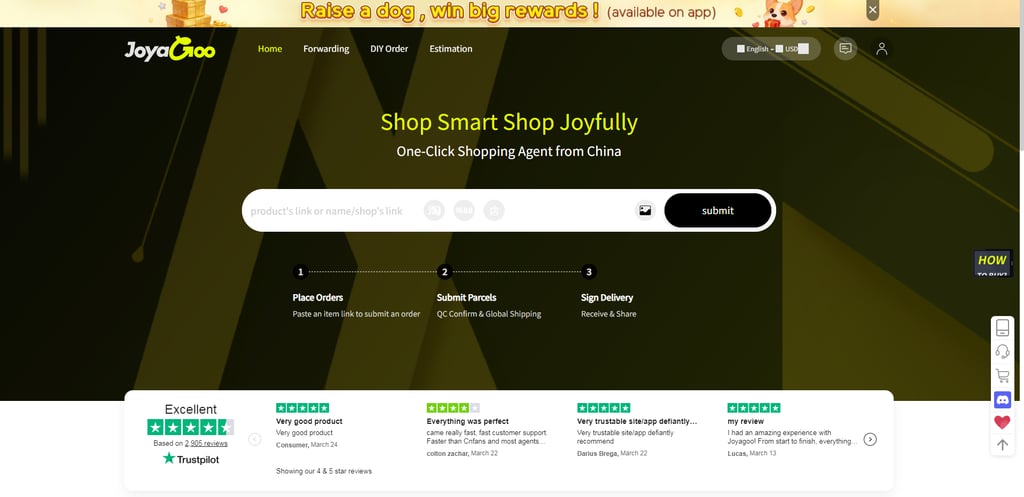
→ Browse the complete Joyagoo Spreadsheet to discover trending items.
This Joyagoo spreadsheet includes all key product categories, such as sneakers, clothing, hoodies, bags, watches, accessories, electronics, and more. You can filter items by platform—Taobao, 1688, or Weidian—sort by price or popularity, and search by product name. It serves as an essential resource for anyone shopping with Joyagoo.
Please note, we do not sell products or handle payments. All purchases are made directly on third-party platforms at your own risk.